Client Setup
Point any OpenAI-compatible client at codex-lb. If API key auth is enabled, pass a key from the dashboard as a Bearer token.
Model availability is discovered from the upstream Codex model catalog and can vary by account plan, workspace, rollout, and upstream deprecation state. Prefer the live GET /v1/models or GET /backend-api/codex/models response over a copied static table when configuring clients or API-key model allowlists.
The examples below use the current frontier lineup: gpt-5.6-sol (strongest), gpt-5.6-terra (balanced), and gpt-5.6-luna (fast) — all with a 272k default input budget and an 872k upstream maximum (opt-in, Codex CLI only). gpt-5.5 and gpt-5.4 are still served for older pinned clients; retired slugs such as gpt-5.3-codex, gpt-5.3-codex-spark, and gpt-5.1-codex-mini were dropped from the upstream bundled catalog and should no longer be used in new configs.
| Client | Endpoint | Config |
|---|---|---|
| Codex CLI | http://127.0.0.1:2455/backend-api/codex |
~/.codex/config.toml |
| OpenCode | http://127.0.0.1:2455/v1 |
~/.config/opencode/opencode.json |
| OpenClaw | http://127.0.0.1:2455/v1 |
~/.openclaw/openclaw.json |
| Hermes Agent | http://127.0.0.1:2455/v1 |
~/.hermes/config.yaml |
| OpenAI Python SDK | http://127.0.0.1:2455/v1 |
Code |
Codex CLI / IDE Extension
~/.codex/config.toml:
model = "gpt-5.6-sol"
model_reasoning_effort = "xhigh"
model_provider = "codex-lb"

[model_providers.codex-lb]
name = "openai"  # required — enables remote /responses/compact. Lowercase since Codex 2026-05-23; older "OpenAI" stops resolving gpt-5.5
base_url = "http://127.0.0.1:2455/backend-api/codex"
wire_api = "responses"
supports_websockets = true
requires_openai_auth = true # required for codex app
Opting into the 872k context window
GPT-5.6 ships a 272,000-token default input budget with an 872,000-token
maximum. codex-lb advertises both — context_window and max_context_window
on GET /backend-api/codex/models — and the Codex CLI stays on the default
until you raise it in ~/.codex/config.toml (top level, before any
[section] header):
model_context_window = 872000
- Values above
max_context_windoware clamped to it:model_context_window = 1000000resolves to 872,000 and does not unlock a 1M window. - Leave
model_auto_compact_token_limitunset. Codex auto-compacts at 90% of the resolved window — 784,800 tokens here — and clamps any larger configured value down to that, so setting900000is a no-op. Set it only to compact earlier. - Cost: input beyond the 272,000-token threshold is metered at the upstream long-context rate. That threshold is why 272,000 stays the default.
These keys are Codex-CLI-only. The OpenCode / OpenClaw / SDK examples below
stay at 272000 because /v1/models reports the default input budget, not the
ceiling.
Daybreak Blue profile (Trusted Access)
Use a separate provider for authorized defensive cybersecurity work. The
ordinary codex-lb provider above must remain free of the capability header;
adding it there would classify every request as requiring the restricted pool.
First add this opt-in provider to the same machine-local
~/.codex/config.toml:
[model_providers.codex-lb-daybreak-blue]
name = "openai"
base_url = "http://127.0.0.1:2455/backend-api/codex"
wire_api = "responses"
env_key = "CODEX_LB_API_KEY"
supports_websockets = true
requires_openai_auth = true
http_headers = { "X-Codex-LB-Required-Capability" = "trusted_cyber" }
Then create ~/.codex/daybreak-blue.config.toml:
model = "gpt-5.6-sol"
model_provider = "codex-lb-daybreak-blue"
Activate it explicitly for the task or orchestration root that needs the restricted route:
export CODEX_LB_API_KEY="sk-clb-..." # key from the dashboard
codex --profile daybreak-blue
codex exec --profile daybreak-blue "<authorized defensive task>"
Current Codex versions load named profiles from sibling
<profile>.config.toml files; legacy [profiles.<name>] tables are no longer
selected. Provider and profile keys are machine-local, so a project
.codex/config.toml cannot activate this route. See the official
Codex profile documentation.
The static header is an authenticated routing requirement, not a grant. Use
this profile only when the selected identity and ChatGPT workspace or API
organization/project are already approved for the intended Codex product
surface. The dedicated provider always supplies a Codex LB API key because
unauthenticated capability carriers are rejected even on a local deployment.
When the capability header is present, Codex LB validates that key for the
request even if global API-key auth is disabled; ordinary requests without the
header keep the deployment's normal auth behavior. Current Codex clients may
fall back from WebSocket to HTTP even when supports_websockets = true, and
static provider headers also accompany control and Images requests. Codex LB
authenticates capability-bearing HTTP and non-Responses WebSocket requests and
then rejects them with required_capability_transport_unsupported before
account selection or upstream dispatch. This includes Responses/compact HTTP
fallback, Codex control, admission, warmup, files, transcription, Chat
Completions, Images, reset-credit consume, and Live WebSockets; Chat Completions
is guarded defensively if a provider client reaches that equivalent routing
sink. Authenticated /models initialization and local API-key usage or
reset-credit listings remain available because they do not route an upstream
account. Restore direct Responses WebSocket availability
instead of removing the carrier or retrying through ordinary HTTP. Codex LB
narrows a direct WebSocket turn's first and later account selections to eligible accounts already marked
security_work_authorized; if none are available, it fails closed without
ordinary fallback. Selecting gpt-5.6-sol by itself does not activate this
path, and a Daybreak alias may resolve to that same underlying model. See
OpenAI's
Trusted Access guidance.
Complete inert examples are available as
config.toml and
daybreak-blue.config.toml. To
roll back, stop using --profile daybreak-blue, remove the profile file, and
optionally remove only the codex-lb-daybreak-blue provider block. No server or
database change is required.
This documented requires_openai_auth = true setup makes the provider eligible
for Codex's built-in $imagegen tool, but the Daybreak carrier is intentionally
rejected on the Images HTTP routes before their ordinary account-routing
pipeline. Consequently $imagegen fails closed inside the Daybreak profile;
do not remove the carrier to make it work during a restricted task. Use the
ordinary provider only for separate work that does not require Daybreak
routing. Provider configurations that intentionally skip OpenAI login have a
different eligibility path; see the Images compatibility context.
WebSocket transport
Optional: pin native upstream WebSockets for Codex streaming while keeping codex-lb pooling.
The upstream stream transport is a dashboard setting: Settings → Routing → Upstream stream
transport (auto, http, or websocket). It applies without a restart and is the only place
this value is configured; there is no environment variable for it.
auto is the default and uses native WebSockets for native Codex headers or models that prefer them.
Note: Codex itself does not currently expose a stable documented
wire_api = "websocket" or WebSocket-only provider mode.
supports_websockets = true enables WebSocket attempts but does not disable
HTTP fallback. Removed responses_websockets feature flags are not a
fail-closed transport control.
Upstream websocket handshakes automatically honor standard proxy environment variables when they are
present. wss:// handshakes check wss_proxy, socks_proxy, https_proxy, and all_proxy;
plain ws:// handshakes also check ws_proxy and http_proxy. Set
CODEX_LB_UPSTREAM_WEBSOCKET_TRUST_ENV=false only when websocket handshakes must bypass those
environment proxies and connect directly.
With API key auth
When API key auth is enabled:
[model_providers.codex-lb]
name = "openai"
base_url = "http://127.0.0.1:2455/backend-api/codex"
wire_api = "responses"
env_key = "CODEX_LB_API_KEY"
supports_websockets = true
requires_openai_auth = true # required for codex app
export CODEX_LB_API_KEY="sk-clb-..."   # key from dashboard
codex
Verify WebSocket transport
Use a one-off debug run:
RUST_LOG=debug codex exec "Reply with OK only."
Healthy websocket signals:
- CLI logs contain
connecting to websocketandsuccessfully connected to websocket codex-lblogs showWebSocket /backend-api/codex/responsescodex-lblogs do not show fallbackPOST /backend-api/codex/responsesfor the same run
If you run codex-lb behind a reverse proxy, make sure it forwards WebSocket upgrades — see Remote Access.
Migrating from direct OpenAI (session retagging)
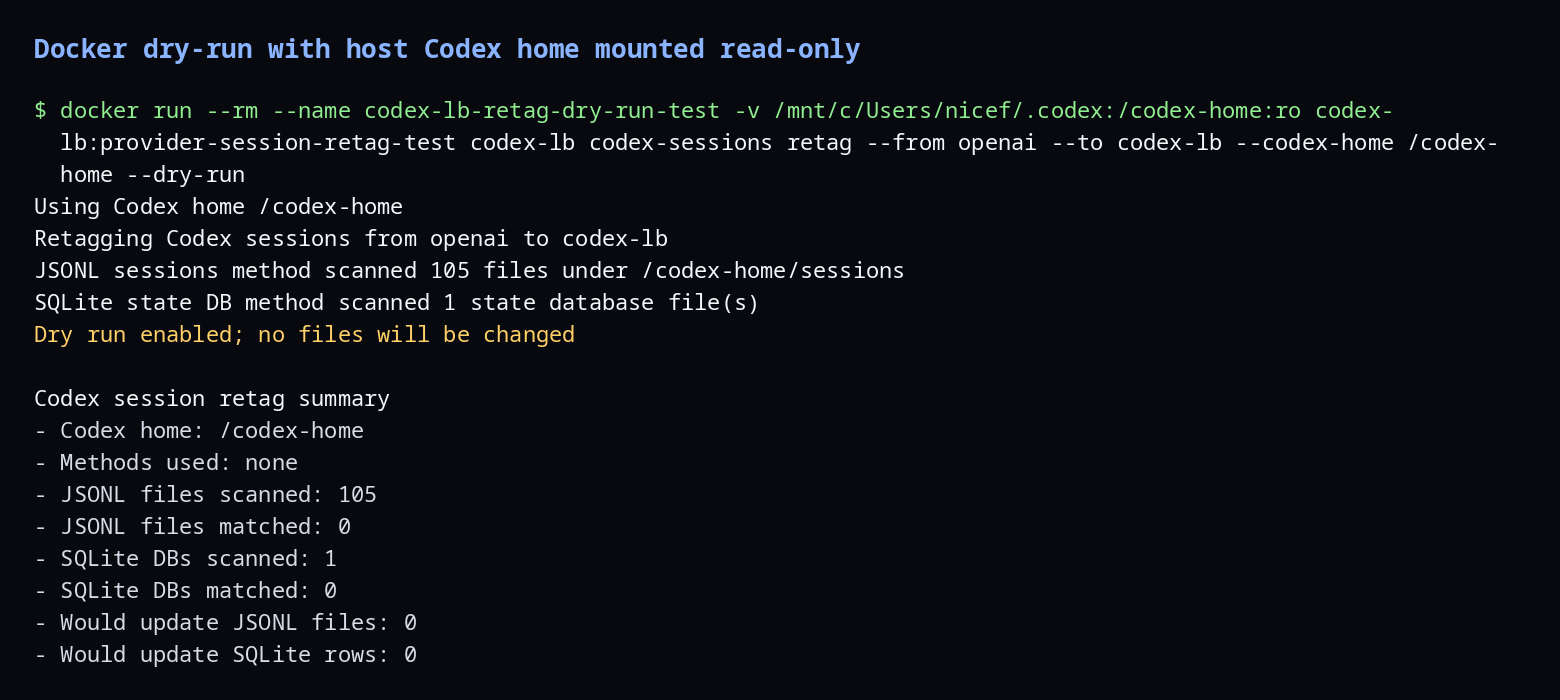
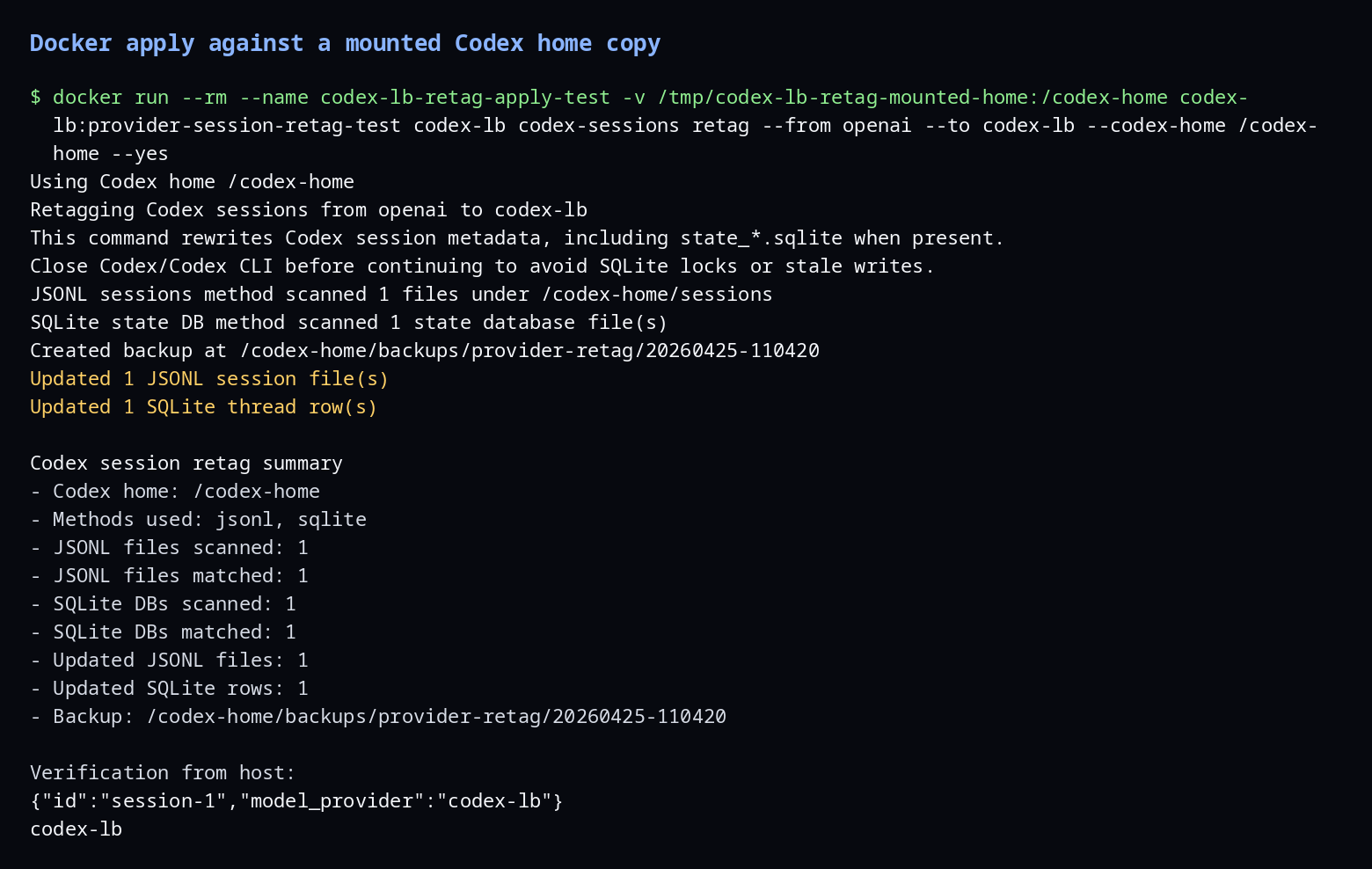
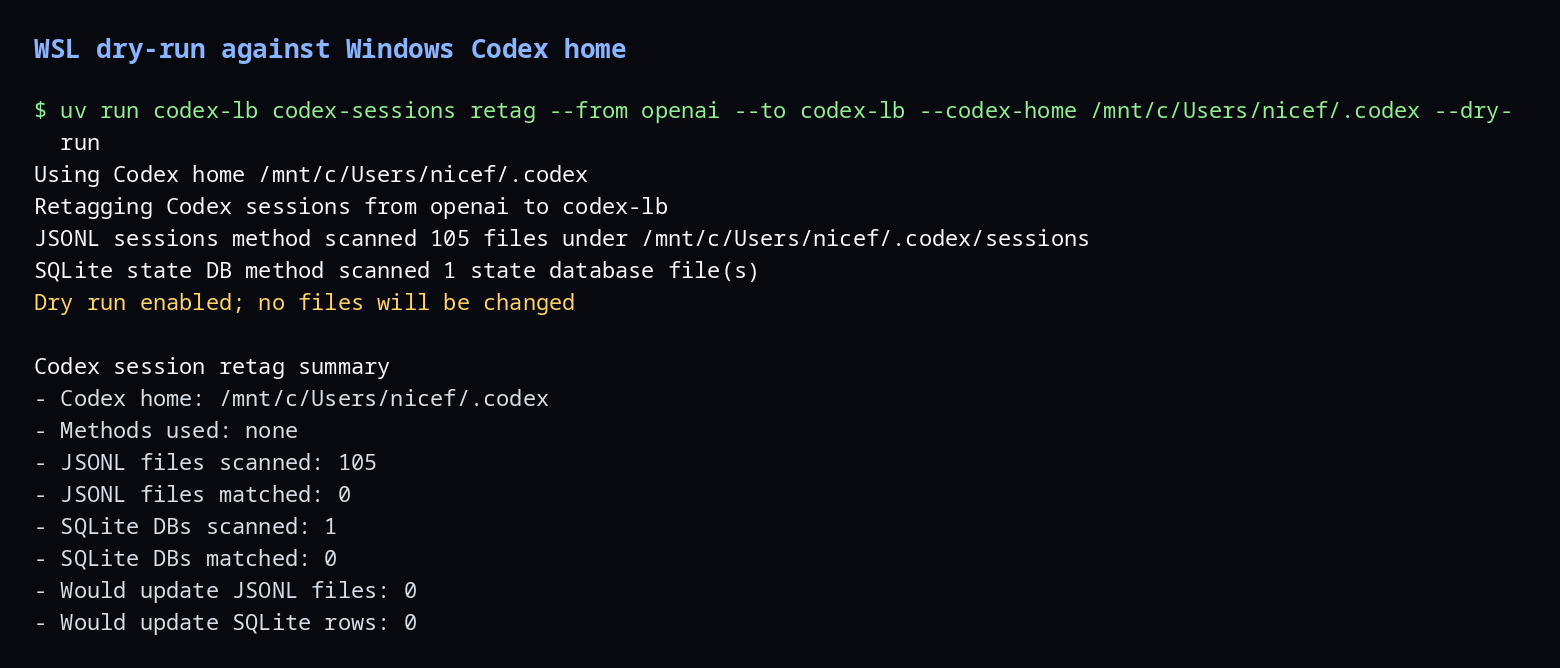
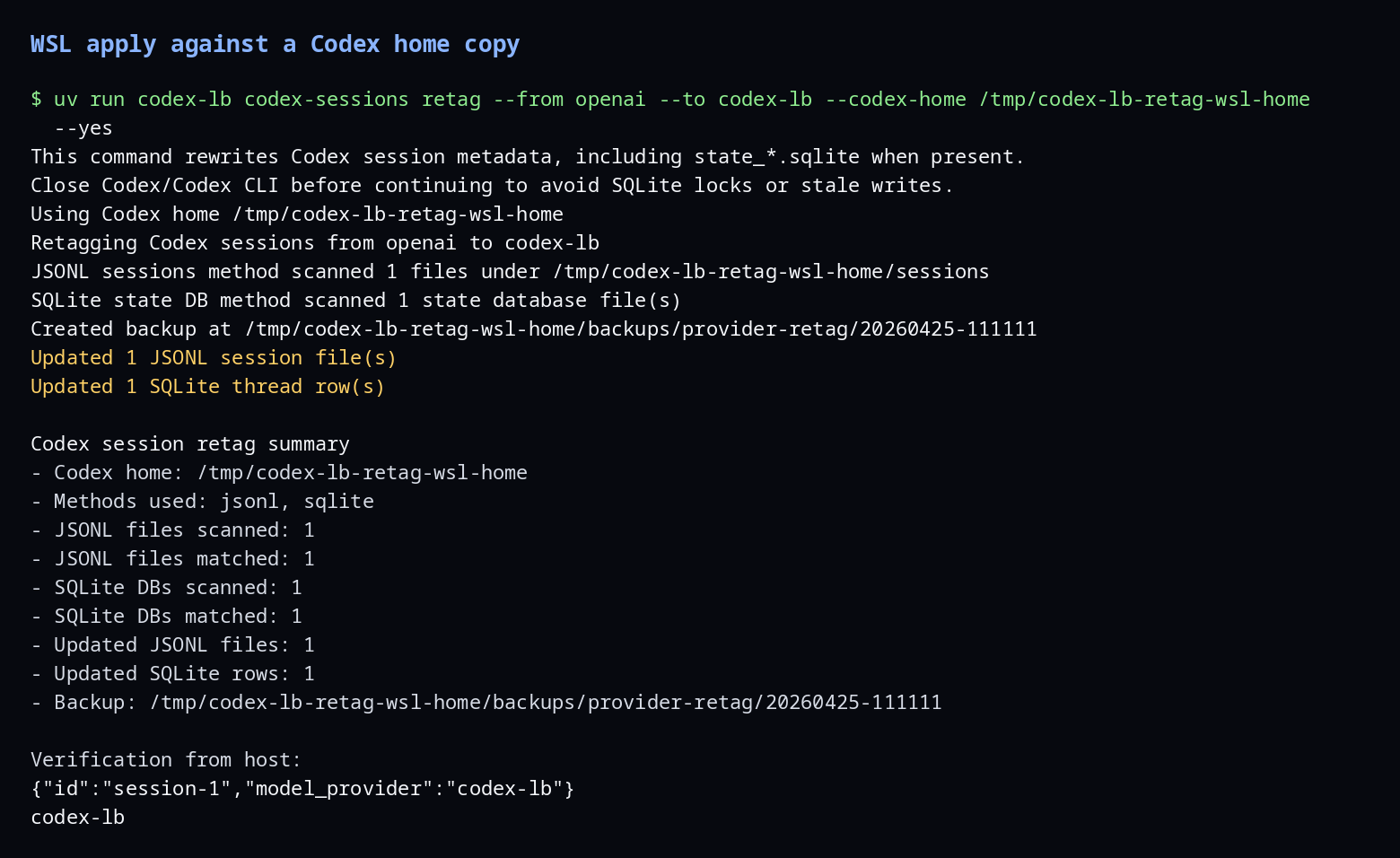
codex resume filters by model_provider; old sessions won't appear until you re-tag them. Use the built-in retag command instead of editing Codex files by hand; see Codex session retagging for backups, Docker, WSL, and rollback details.
# Preview what will change first.
codex-lb codex-sessions retag --from openai --to codex-lb --dry-run

# Then close Codex/Codex CLI and apply the retag.
codex-lb codex-sessions retag --from openai --to codex-lb --yes
| Dry run (Docker) | Apply (Docker) |
|---|---|
 |
 |
| Dry run (WSL) | Apply (WSL) |
|---|---|
 |
 |
OpenCode
Important
Use the built-in openai provider with baseURL override — not a custom provider with @ai-sdk/openai-compatible. Custom providers use the Chat Completions API which drops reasoning/thinking content. The built-in openai provider uses the Responses API, which properly preserves encrypted_content and multi-turn reasoning state.
Before starting, please ensure that all existing OpenAI credentials are cleared in ~/.local/share/opencode/auth.json.
You can clean the config by using this one-liner:
jq 'del(.openai)' ~/.local/share/opencode/auth.json > auth.json.tmp && mv auth.json.tmp ~/.local/share/opencode/auth.json
~/.config/opencode/opencode.json:
{
  "$schema": "https://opencode.ai/config.json",
  "provider": {
    "openai": {
      "options": {
        "baseURL": "http://127.0.0.1:2455/v1",
        "apiKey": "{env:CODEX_LB_API_KEY}"
      },
      "models": {
        "gpt-5.6-sol": {
          "name": "GPT-5.6-Sol",
          "reasoning": true,
          "options": { "reasoningEffort": "xhigh", "reasoningSummary": "detailed" },
          "limit": { "context": 272000, "output": 65536 }
        },
        "gpt-5.6-terra": {
          "name": "GPT-5.6-Terra",
          "reasoning": true,
          "options": { "reasoningEffort": "high", "reasoningSummary": "detailed" },
          "limit": { "context": 272000, "output": 65536 }
        },
        "gpt-5.6-luna": {
          "name": "GPT-5.6-Luna",
          "reasoning": true,
          "options": { "reasoningEffort": "medium", "reasoningSummary": "detailed" },
          "limit": { "context": 272000, "output": 65536 }
        },
        "gpt-5.5": {
          "name": "GPT-5.5",
          "reasoning": true,
          "options": { "reasoningEffort": "high", "reasoningSummary": "detailed" },
          "limit": { "context": 272000, "output": 65536 }
        }
      }
    }
  },
  "model": "openai/gpt-5.6-sol"
}
This overrides the built-in openai provider's endpoint to point at codex-lb while keeping the Responses API code path that handles reasoning properly.
export CODEX_LB_API_KEY="sk-clb-..."   # key from dashboard
opencode
OpenClaw
~/.openclaw/openclaw.json:
{
  "agents": {
    "defaults": {
      "model": { "primary": "codex-lb/gpt-5.6-sol" },
      "models": {
        "codex-lb/gpt-5.6-sol": { "params": { "cacheRetention": "short" } },
        "codex-lb/gpt-5.6-terra": { "params": { "cacheRetention": "short" } },
        "codex-lb/gpt-5.6-luna": { "params": { "cacheRetention": "short" } }
      }
    }
  },
  "models": {
    "mode": "merge",
    "providers": {
      "codex-lb": {
        "baseUrl": "http://127.0.0.1:2455/v1",
        "apiKey": "${CODEX_LB_API_KEY}",   // or "dummy" if API key auth is disabled
        "api": "openai-responses",
        "models": [
          {
            "id": "gpt-5.6-sol",
            "name": "gpt-5.6-sol (codex-lb)",
            "contextWindow": 272000,
            "contextTokens": 272000,
            "maxTokens": 4096,
            "input": ["text"],
            "reasoning": false
          },
          {
            "id": "gpt-5.6-terra",
            "name": "gpt-5.6-terra (codex-lb)",
            "contextWindow": 272000,
            "contextTokens": 272000,
            "maxTokens": 4096,
            "input": ["text"],
            "reasoning": false
          },
          {
            "id": "gpt-5.6-luna",
            "name": "gpt-5.6-luna (codex-lb)",
            "contextWindow": 272000,
            "contextTokens": 272000,
            "maxTokens": 4096,
            "input": ["text"],
            "reasoning": false
          }
        ]
      }
    }
  }
}
Set the env var or replace ${CODEX_LB_API_KEY} with a key from the dashboard. If API key auth is disabled,
local requests can omit the key, but non-local requests are still rejected until proxy authentication is configured.
The /v1 route is the simplest OpenAI-compatible setup. If your OpenClaw build uses a Codex-native provider path such as openai-codex-responses and needs Codex-style usage/accounting behavior, point that provider at http://127.0.0.1:2455/backend-api/codex instead. For third-party Codex-compatible backends, the client must allow opaque bearer-token passthrough and should only send chatgpt-account-id when it actually decoded one from an official ChatGPT/Codex token.
Hermes Agent
Hermes Agent works with any model provider; point a named custom provider at codex-lb with the codex_responses API mode so multi-turn reasoning state is preserved over the Responses API (the plain chat_completions mode drops reasoning content, same caveat as OpenCode).
~/.hermes/config.yaml:
custom_providers:
  - name: codex-lb
    base_url: http://127.0.0.1:2455/v1
    key_env: CODEX_LB_API_KEY   # omit for local runs without API key auth
    api_mode: codex_responses
Then select the model interactively with hermes model, or in a session:
/model custom:codex-lb:gpt-5.6-sol
export CODEX_LB_API_KEY="sk-clb-..."   # key from dashboard
hermes
OpenAI Python SDK
from openai import OpenAI

client = OpenAI(
    base_url="http://127.0.0.1:2455/v1",
    api_key="sk-clb-...",  # from dashboard, or any non-empty string if auth is disabled
)

response = client.chat.completions.create(
    model="gpt-5.6-terra",
    messages=[{"role": "user", "content": "Hello!"}],
)
print(response.choices[0].message.content)
Specs: responses-api-compat · images-api-compat · chat-completions-compat · realtime-api-compat · proxy-admission-control · proxy-warmup · files-upload-protocol · audio-transcriptions-compat · model-catalog-compat · runtime-portability